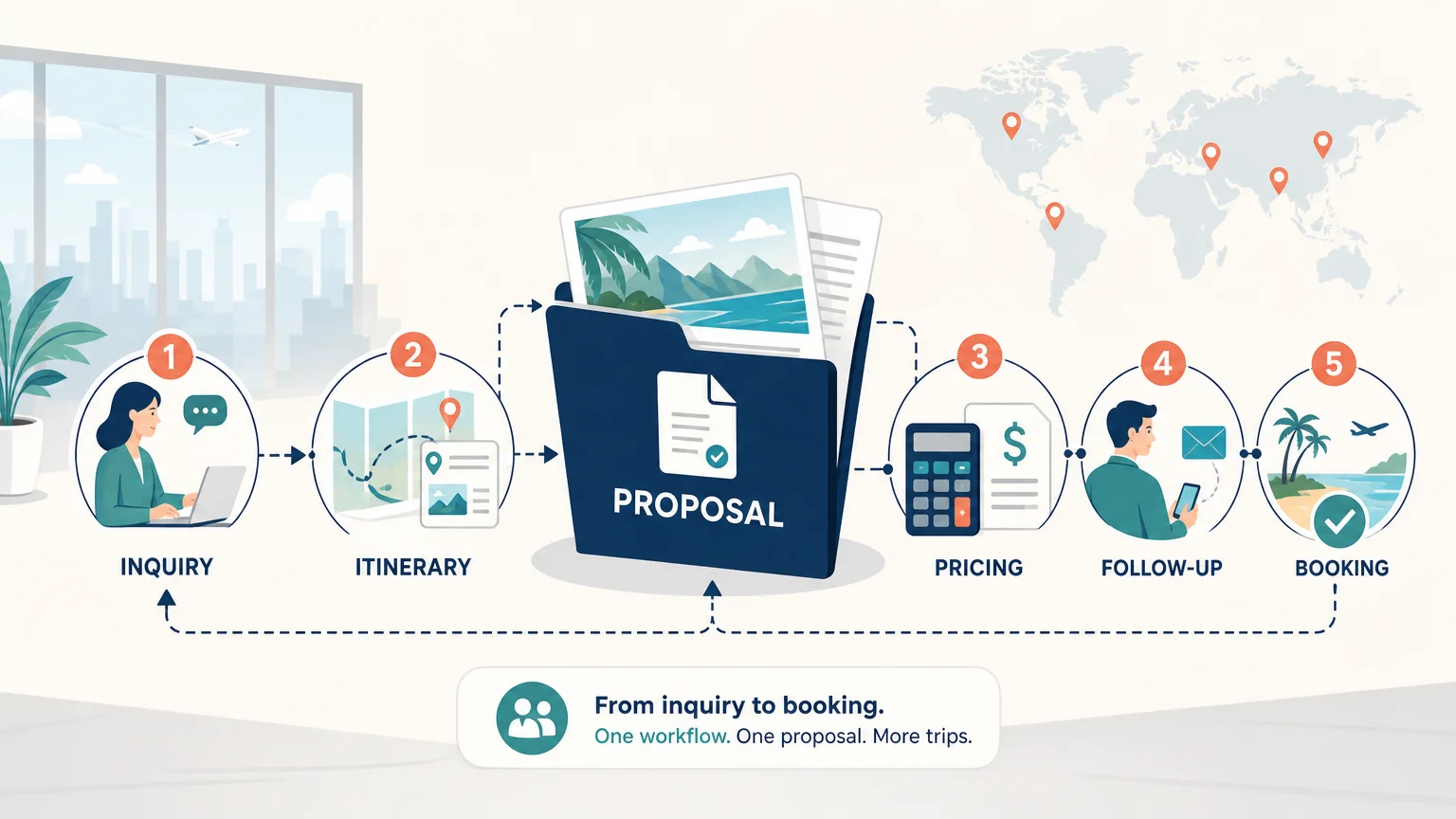
Summary: The right travel agency software for sales teams connects inquiries, proposals, pricing, follow-ups, and operational handoffs in one shared workflow. Prioritize travel-specific quotation tools, CRM visibility, reusable content, margin control, integrations, and implementation support so your team can respond faster without sacrificing accuracy.
How quickly can your team turn an inquiry into a confident, profitable proposal? The answer depends less on a long feature list than on whether your system connects lead ownership, itinerary design, pricing, follow-up, and handoff. Our travel agency sales pipeline software helps frame that commercial workflow around one shared record, rather than scattered spreadsheets, inboxes, and documents.
The software category is broad. In September 2026, G2 tracked 248 travel agency software products, with an average category rating of 4.39 out of 5 based on submitted reviews. That variety makes selection more difficult, because itinerary builders, CRMs, booking platforms, and back-office systems can all appear under the same label.
What does travel agency software need to do for sales teams?
A sales team needs more than a database of contacts. It needs a connected process that moves each opportunity from the first inquiry to a clear proposal, a follow-up task, an approval, and eventually a confirmed booking.
That process usually includes five connected stages:
GetApp’s August 2026 category page listed 37 travel agency software options with sales pipeline management. This reflects a real buying challenge: teams must distinguish software that merely stores opportunities from software that supports the specific work required to sell tailor-made travel.
For example, a generic CRM may help an agent record a contact and schedule a reminder. It may not calculate travel markups, reuse destination content, manage supplier rates, or produce a polished day-by-day proposal. A travel-specific platform connects those steps, reducing the need to copy information between separate tools.
Why is a connected quote workflow more important than a feature list?

A quotation is not only a document. It is the point where customer expectations, supplier costs, commercial strategy, and operational feasibility meet.
When those elements live in separate files, small changes create large risks. A supplier updates a rate, a traveler changes the number of participants, or an agent modifies the itinerary. The team must then update the budget, proposal, internal notes, and follow-up manually.
A connected workflow keeps one version of the trip at the center. When the itinerary changes, pricing and documents can be updated from the same information. This reduces repetitive formatting and gives sales representatives more time to understand the client’s priorities.
When sales and production share a common data model, our integrated CRM for travel agencies helps keep customer history, trip details, supplier information, and follow-up activity connected. This is particularly useful when several people contribute to one opportunity, such as a sales representative, a travel designer, a finance colleague, and an operations manager.
The practical advantage is not simply speed. It is consistency. A consistent process makes it easier to compare opportunities, review proposal quality, identify stalled leads, and understand whether the quoted margin remains realistic.
Which capabilities should you evaluate first?
Six capabilities deserve close attention when you compare travel agency software for sales teams.
1. Pipeline and inquiry management
Your team should be able to see every opportunity by stage, owner, destination, travel date, and next action. The pipeline should support more than generic labels such as “new” or “closed.” Useful stages may include inquiry received, qualified, itinerary in progress, proposal shared, approval pending, deposit received, and booking confirmed.
Look for assignment rules, activity history, reminders, and search tools. A manager should be able to identify unattended inquiries without asking each agent for a manual update.
2. Travel quotation and proposal creation
Sales teams need to create attractive proposals without rebuilding every document from scratch. Essential functions include day-by-day itinerary editing, reusable project templates, supplier and product catalogs, multiple quote versions, branded PDF documents, web presentations, and client approval options.
The tool should also make revisions practical. A client may request a different hotel, an extra destination, a new travel date, or a change in room configuration. Your team should be able to update the proposal without duplicating the entire file.
3. Pricing, markup, and margin visibility
Travel sales software should show costs, markups, projected margins, and actual results in a way that supports daily decisions. This is especially important for bespoke travel, where each proposal may combine different suppliers, currencies, taxes, and service conditions.
Ask whether the system separates supplier cost from client price. Confirm whether it supports multiple currencies, margin calculations, payment tracking, and comparisons between projected and actual results.
4. CRM and client communication
A useful travel CRM stores the client’s preferences, trip history, communications, documents, and proposal activity in one record. This enables a sales representative to continue a conversation without reconstructing context from email threads.
It should also support personalized communication. Travelers may ask questions through email, a web form, or a client portal. Your team should know what was requested, what was promised, and what action is due next.
5. Automation and follow-up
Automation should support the sales process without making communication feel impersonal. Practical examples include reminders after a proposal is opened, tasks for unanswered inquiries, approval notifications, payment reminders, and follow-up sequences based on the opportunity stage.
Automation is most valuable when it removes repetitive administration. It should not replace judgment about the traveler, the trip, or the right moment to contact the client.
6. Collaboration and access control
Sales teams often work across destinations, languages, time zones, and departments. Role based access, shared records, internal notes, project ownership, and controlled permissions help maintain accountability without exposing every function to every user.
For international agencies, verify support for multi-country projects, multi-currency pricing, multilingual content, multiple brands, and different user rights.
How can Ezus support the sales process from inquiry to booking?
Sales teams serving tailor-made travel need a workflow that extends beyond lead tracking. Our platform brings request intake, itinerary design, budgeting, pricing, quotation, proposal sharing, approvals, CRM follow-up, supplier booking, invoicing, payment, and financial tracking into one cloud workspace.
The result is a single commercial workflow rather than a collection of disconnected documents. Teams can use project templates to reuse successful itineraries, content, products, budgets, and pricing structures. They can then adapt those templates for a new destination, traveler profile, or group request.
Our platform also supports branded PDF documents, interactive web presentations, personalized traveler portals, supplier and product catalogs, and role based collaboration. Sales representatives can share proposals for review and approval while keeping the underlying trip data connected to pricing and operational information.
For agencies that want to improve response quality as well as turnaround time, our software to boost travel agency conversions supports faster proposals, automated follow-ups, digital approvals, and more consistent client communication. These capabilities are intended to reduce repetitive work, not to promise a universal conversion increase.
Our platform is used by more than 600 agencies in more than 70 countries, with more than 4,000 active monthly users and more than 11,000 unique itineraries created each month. These figures show the international scope of the platform, while individual results still depend on workflow design, data quality, adoption, and implementation.
A customer testimonial from Elux Group describes a 25% productivity gain in building and pricing proposals. Travel Exclusive Asia reports reducing re-quoting from 15 to 20 minutes to a maximum of 5 minutes. These are customer-reported examples tied to named workflows, not independent performance guarantees.
What should you budget for pricing and implementation?
Price should be evaluated alongside onboarding, migration, training, integrations, and user growth. A low subscription price may not represent a lower total cost if your team still needs extensive manual work or external configuration.
Our Professional plan is listed at €75 per user per month when billed annually. The Premium plan is listed at €100 per user per month when billed annually. Enterprise is billed annually and priced on request for organizations starting from 30 users. Displayed subscription prices exclude tax.
A mandatory one-time Onboarding Pack costs €1,990 excluding tax. It covers configuration, training, onboarding resources, and support intended to prepare the team for operational use. Formatted data import is listed at €390 excluding tax, while raw-data migration is assessed according to the work involved.
Subscriptions renew annually unless cancelled under the service agreement. Added users are billed pro rata, and access begins from the onboarding kick-off meeting rather than solely from payment confirmation. These conditions should be included in your first-year budget.
Our travel agency CRM software is designed for agencies that need sales, production, operations, and finance to work from connected information. The Premium plan includes an Account Manager from three users, while Enterprise provides a tailored scope for larger organizations.
Implementation also deserves a clear owner inside your agency. Assign someone to define pipeline stages, approve templates, coordinate data preparation, organize training, and monitor adoption. Without internal ownership, even capable software can become another underused system.
How should you test software before making a decision?
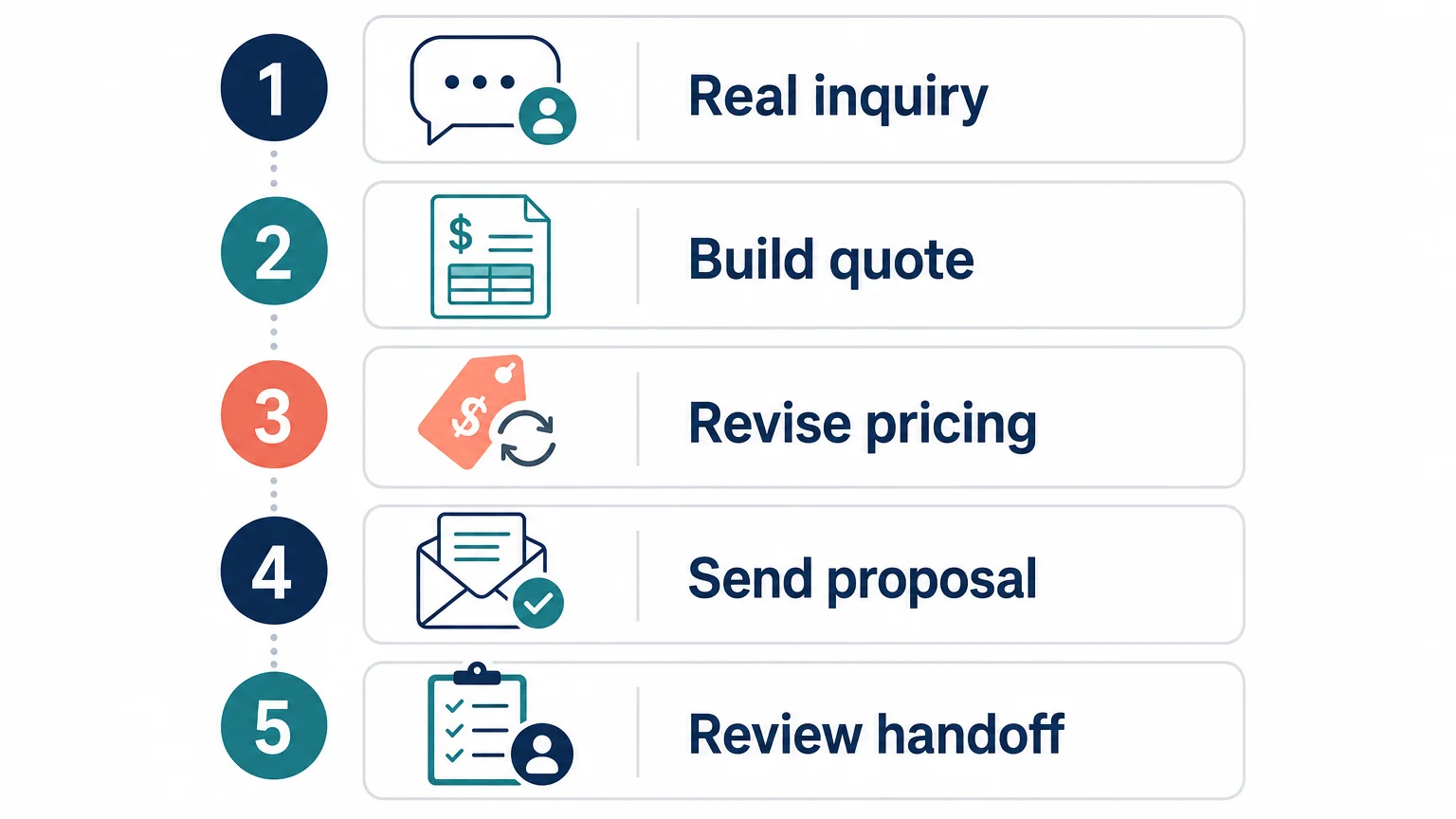
A structured test is more reliable than a generic product demonstration. Prepare three real or anonymized inquiries that represent your normal workload. Include one simple request, one multi-destination trip, and one group or MICE project if those are important to your business.
Also test integrations with the tools your team already uses. Important areas may include accounting software, email, document tools, CRM systems, payment services, supplier platforms, APIs, webhooks, single sign-on, and no-code connectors.
A July 2026 industry guide grouped travel software into advisor tools, payment focused systems, operations platforms, and booking infrastructure. This is a useful reminder that two products can both advertise CRM and itineraries while solving different operational problems.
The software category overview
Finally, ask the vendor to explain what happens after the sale. Sales teams should understand how confirmed proposals become bookings, how supplier information is shared, how invoices and payments are tracked, and how changes reach the people responsible for delivery.
Choose the workflow that removes your biggest sales bottleneck
The most useful travel agency software for sales teams is not the platform with the longest feature list. It is the system that connects inquiries, quotation, pricing, communication, follow-up, and handoff in a process your team can repeat accurately. Before deciding, test the software with real trip requests, check the total implementation cost, and verify that the platform supports both your current workload and your next stage of growth.
Equip Your Sales Team With Travel Agency Software
When your sales team is managing inquiries across spreadsheets, inboxes, and disconnected files, response quality can become difficult to control. A connected travel workflow gives your team clearer ownership, reusable content, proposal consistency, and better visibility into costs and margins.
Our platform supports travel agencies, DMCs, tour operators, tailor-made travel businesses, and MICE teams from request intake through proposal, approval, booking, invoicing, and financial tracking. Explore travel agency software and request a demonstration based on your own sales process.
Frequently Asked Questions
What is travel agency software for sales teams?
It is software that connects inquiry management, CRM records, itinerary creation, pricing, proposals, follow-up, and booking handoffs. Unlike a basic contact database, it supports the travel-specific work required to prepare and sell customized trips.
Which features matter most for a travel sales team?
Prioritize pipeline visibility, quotation automation, reusable itinerary templates, margin tracking, client communication, follow-up reminders, permissions, and integrations. The right combination depends on whether your main bottleneck is lead response, proposal production, pricing accuracy, or team coordination.
Can travel agency software manage both sales and operations?
Many travel platforms connect sales with production, supplier management, invoicing, payments, and financial tracking. Ezus is designed for this connected workflow, allowing sales, production, finance, and operations teams to work from shared travel information.
How much does travel agency sales software cost?
Costs vary according to users, features, integrations, implementation, and migration requirements. Ezus lists Professional at €75 per user per month and Premium at €100 per user per month when billed annually, excluding tax, with a mandatory one-time Onboarding Pack priced at €1,990 excluding tax.
How can an agency test a platform before subscribing?
Use several real or anonymized inquiries and test the complete workflow from intake to proposal, revision, follow-up, approval, and handoff. Ask the vendor to demonstrate your own destinations, pricing rules, templates, integrations, and reporting needs rather than relying only on a standard presentation.
.jpeg)

Join Ezus today
Request a demo today and discover how our software can help you reach new heights.




.jpg)