Searching for free software for tour operators is reasonable when you are testing a new activity, managing one simple tour, or protecting cash flow during an early stage. The important distinction is between a genuinely free tool, a limited free tier, a free trial, and software that charges commission instead of a subscription. To centralize more than bookings, you can also review our free travel agency back-office software guidance.
The market is moving toward broader cloud platforms that combine reservations, itineraries, customer data, payments, availability, and reporting. A 2026 market report estimates that the global tour operator software market will reach approximately $0.9 billion in 2026. This context matters because free tools often solve one task, while growing operators need a connected workflow.
What does free software for tour operators really include?
A free plan usually gives you access to a narrow operational layer. That may be enough for a solo guide who receives a small number of requests each month. It may also help you validate demand before investing in a complete technology stack.
Common free capabilities include an online booking page, a basic calendar, customer forms, email confirmations, and limited payment connections. Some tools also support simple reminders, staff logins, website buttons, or integrations with general calendar applications. These functions can remove repetitive phone calls and reduce the risk of forgetting a booking request.
However, free access rarely means unlimited business functionality. Restrictions may apply to:
- Monthly bookings or future appointments
- Number of users, guides, or resources
- Payment processing and deposit collection
- Automated messages and custom email templates
- Group capacity, seasonal pricing, and cancellation rules
- Reporting, exports, and customer history
- Website branding and booking page customization
- Connections with marketplaces, accounting tools, or CRM systems
Before you create an account, identify the exact task you want to solve. A calendar tool may be sufficient for private appointments. A booking engine may be more suitable for scheduled activities with fixed capacity. A tour management platform is more appropriate when you sell multi-day programs, manage suppliers, prepare quotes, and monitor profitability.
Why can free software become expensive over time?
Free software usually removes a subscription cost, but it does not remove operational work. If availability, payments, confirmations, supplier details, and customer communication remain separate, your team may spend more time maintaining the process than serving travelers.
Manual administration creates several forms of hidden cost. You may need to copy customer details into a spreadsheet, update availability on several channels, send payment reminders, prepare invoices, and reconcile supplier costs. These tasks become especially difficult when several people handle the same tour or when customers request changes after booking.
Another issue is the difference between direct booking and commission-based software. A platform may advertise no monthly fee while charging a percentage of each transaction. That model can work when demand is irregular, but the cost grows with revenue. A fixed subscription can become more predictable once booking volume increases.
Data portability is another consideration. Check whether you can export customer records, bookings, products, prices, and reports in a usable format. If the free tool cannot provide structured exports, changing systems later may require manual reconstruction. The apparent saving can then include migration time, lost history, and retraining.
One 2026 category page from G2’s free software listings tracks 259 products in the broader tour operator software category. This variety gives you more choice, but it also makes feature comparison essential. A tool can be free and still be unsuitable for your business model.
Which type of free tool fits your operation?
Imagine three operators. The first offers one walking tour twice a week. The second sells several departures through a website and online marketplaces. The third designs customized, multi-day trips with transport, accommodation, guides, and supplier contracts. Each operator has a different software requirement.

General scheduling tools can suit the first operator. They are useful for collecting appointments, showing availability, and sending reminders. Their limitations often appear when you need capacity control, variable pricing, multiple guides, deposits, customer histories, or marketplace synchronization.
Free booking platforms may suit the second operator during a testing phase. They can provide a booking page, payment connection, automated confirmations, and basic availability. You should still verify whether the free plan includes your required number of bookings, payment methods, resources, and sales channels.
Open-source or self-hosted software can offer flexibility, but technical responsibility shifts to you. Installation, hosting, security updates, backups, integrations, and troubleshooting may require specialist support. If you are evaluating that model, our guide to our open-source tour operator software options can help you assess the trade-offs.
Travel operations platforms address the third operator’s broader needs. They may include itinerary production, quotation, supplier management, budgeting, CRM, invoicing, payment tracking, and client communication. These systems are not usually free, but they can reduce the number of disconnected tools your team must maintain.
| Software category | Suitable use | Typical limitation |
|---|---|---|
| Our Ezus platform | Complex itineraries, quotes, suppliers, budgets, CRM, operations, and finance | Subscription and onboarding investment |
| Free booking tier | Testing direct bookings and simple scheduled activities | Caps on bookings, users, payments, or features |
| General scheduler | Simple appointments, availability, and reminders | Limited tour-specific operations and financial controls |
| Open-source or self-hosted tool | Organizations with technical resources and customization needs | Hosting, maintenance, security, and implementation responsibility |
| Forms and spreadsheets | Very low-volume booking requests and early validation | Manual availability, payment, confirmation, and reporting work |
When is a free plan enough for a tour operator?
A free plan can be a sensible starting point when your operation has limited complexity. You may only need one booking page, one calendar, a small number of services, and basic confirmation messages. In that situation, paying for advanced automation before you have stable demand may not be necessary.
Free software is particularly practical when you:
- Offer one or two tours with fixed prices
- Manage bookings yourself
- Receive a small and predictable number of reservations
- Use one primary sales channel
- Do not need complex supplier or inventory management
- Can process exceptions manually
It becomes less suitable when your operation includes several guides, destinations, currencies, brands, or departure types. The same applies when you sell packages that combine accommodation, transport, activities, and additional services. In those cases, the problem is no longer simply accepting a reservation. You need reliable coordination between sales, production, finance, and operations.
Recent operator research also shows why automation is becoming a practical consideration rather than a purely technical preference. In 2026, research summarized in a travel operator report found that 19% of surveyed tour operators were actively using artificial intelligence, while 33% were testing it. You do not need artificial intelligence to run a tour business, but you should consider whether your software reduces repetitive work as your activity grows.
For smaller teams, our small tour operator software guidance explains how to prioritize useful capabilities without buying a system that is unnecessarily complex.
What should you check before choosing free software?
The word “free” should be the beginning of your evaluation, not the end. Review the complete workflow from the first inquiry to the final payment and post-trip communication.
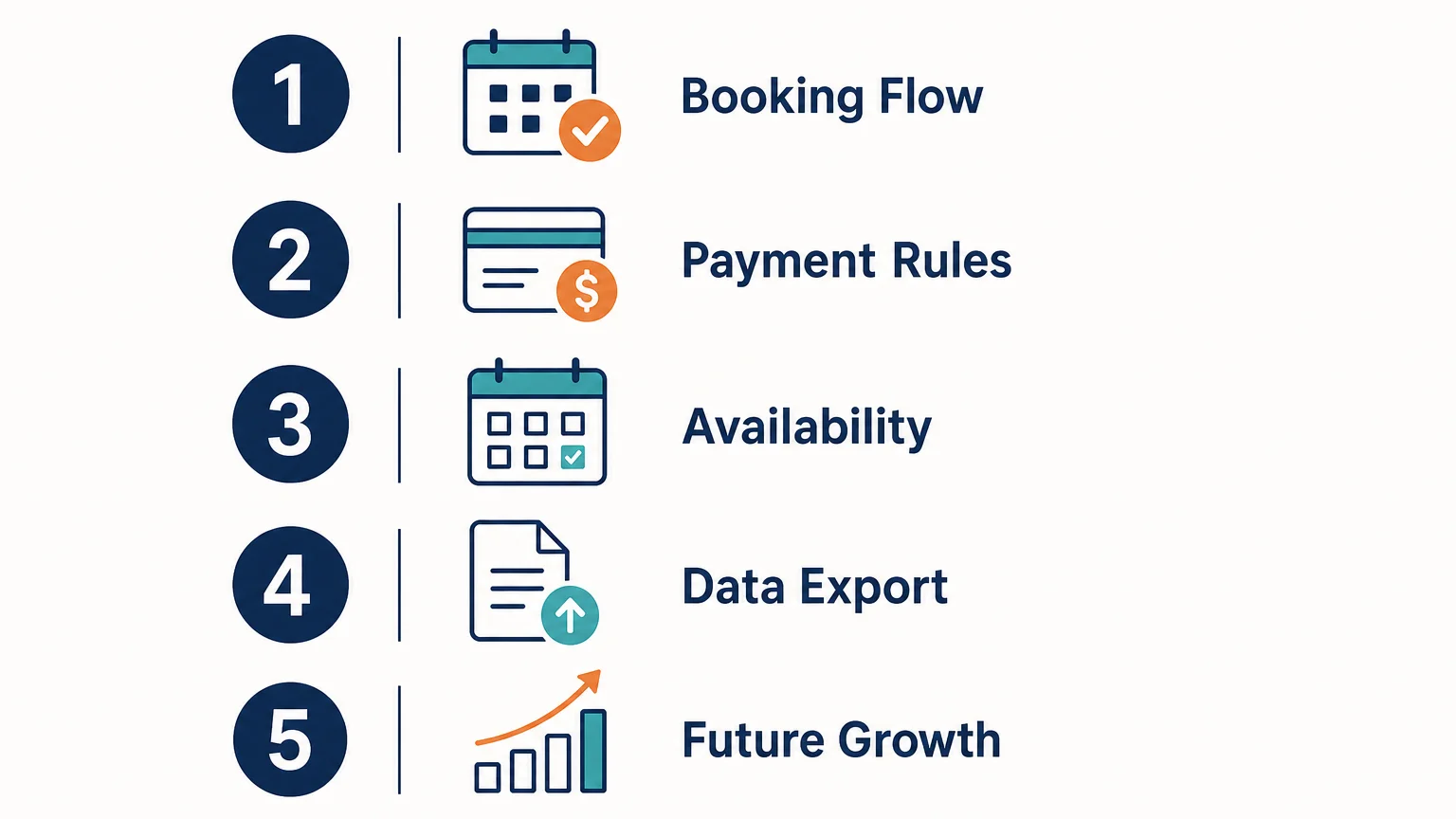
1. Booking and availability
Confirm how customers book, reschedule, cancel, and join a waiting list. Check whether availability updates automatically when a guide, vehicle, room, or activity slot becomes unavailable. A tool that only records requests may still require manual confirmation and capacity management.
2. Payments and financial controls
Check whether you can accept full payment, deposits, or invoices for groups. Review transaction fees, supported payment methods, refund workflows, tax settings, and payment reconciliation. If you sell packages, make sure the system can distinguish customer revenue from supplier costs.
3. Team access and collaboration
Ask how many users can access the system and whether permissions can be assigned by role. Sales, finance, production, and guides should not necessarily have identical access. Shared notes, activity histories, and structured handovers can prevent information from remaining in personal inboxes.
4. Data export and integrations
Look for exports in practical formats and verify whether customer, booking, product, and financial data can be retrieved. If you use accounting software, CRM tools, website systems, or online marketplaces, review available integrations before committing to a workflow that may be difficult to change.
5. Growth and implementation
Estimate what happens when you add staff, destinations, products, languages, currencies, or brands. Some free tools work well at low volume but require a complete rebuild when your business expands. A clear upgrade path is valuable if you expect demand to increase.
Research from Arival’s operator landscape emphasizes the importance of direct booking infrastructure, repeatable content, and customer-owned marketing channels in 2026. This supports a broader buying principle: choose software that helps you build a durable operating process, rather than only solving today’s booking form problem.
How can you move from free tools to a scalable system?
The transition does not have to happen all at once. Start by documenting your current process. List the information you collect, the documents you create, the suppliers you contact, the payments you track, and the messages you send before and after departure.
Next, separate essential functions from temporary workarounds. A basic form may remain useful for collecting a special request, but it should not be responsible for availability, payment reconciliation, supplier bookings, or financial reporting. Those responsibilities require more structured controls.
A scalable platform should help you connect the following workflow:
- Capture the client request and relevant traveler details.
- Build an itinerary with products, suppliers, dates, and content.
- Calculate costs, markups, prices, and projected margins.
- Generate a branded quotation or proposal.
- Collect approval, payment, and booking information.
- Coordinate suppliers, internal teams, and operational documents.
- Track invoicing, actual costs, and final profitability.
Our best tour operator software comparison can help you frame this assessment around workflow coverage, customization, collaboration, integrations, and implementation support. The objective is not to replace every tool immediately. It is to identify where fragmentation creates the most risk or wasted time.
For a travel agency, DMC, or tour operator managing bespoke programs, our platform brings itinerary creation, dynamic budgeting, quotations, client proposals, CRM, supplier data, invoicing, payment workflows, and financial tracking into one environment. Onboarding, training, migration, and integrations can then be evaluated as part of the implementation rather than treated as separate afterthoughts.
Choose software according to operational complexity
Free software for tour operators can be useful when you need a simple booking page, calendar, or testing environment. It becomes risky when manual work affects availability, payment collection, customer service, supplier coordination, or margin visibility. Assess your complete workflow, calculate the cost of administration, and choose a system that can support the level of complexity you expect to manage in 2026 and beyond.
Take action with Ezus
If your current free tools cover bookings but leave itineraries, quotations, suppliers, budgets, and follow-up scattered across different files, the next step is to centralize the workflow. A structured system can give your team a clearer process without forcing sales, production, finance, and operations to work from disconnected information.
Our tour operator software supports itinerary design, dynamic budgeting, branded proposals, CRM, supplier management, invoicing, payments, financial tracking, client portals, templates, and integrations. Ezus also provides onboarding, configuration, training, support, and optional data migration to help your team move from spreadsheets and fragmented tools toward a more consistent travel production and operations process.
Frequently Asked Questions
Is free software suitable for a new tour operator?
Yes, if you offer a small number of simple tours and can manage exceptions manually. Before choosing a free plan, verify its booking limits, payment features, availability controls, and data export options.
What is the difference between a free plan and a free trial?
A free plan may remain available indefinitely with limited features or usage. A free trial usually provides broader access for a fixed period, after which you must subscribe or stop using the software.
Can free software manage group and multi-day tours?
Some free tools can record group requests, but they may not manage complex capacity, supplier costs, rooming lists, payment schedules, and itinerary changes. For multi-day or customized programs, review the complete operational workflow rather than the booking form alone.
When should a tour operator upgrade to paid software?
Consider upgrading when you spend substantial time copying data, updating several calendars, preparing quotations, or reconciling payments. An upgrade is also appropriate when you add staff, sales channels, destinations, suppliers, or more complex pricing rules.
Can Ezus replace spreadsheets and disconnected travel tools?
Our platform is designed to centralize travel production, sales, operations, and financial workflows. It can support itineraries, budgets, proposals, CRM, supplier management, invoicing, payments, templates, client portals, integrations, and data migration, depending on your selected configuration.
.jpeg)

Join Ezus today
Request a demo today and discover how our software can help you reach new heights.

.jpg)