Summary: To create a trip itinerary, begin with your purpose, dates, budget, travel pace, and non-negotiable experiences. Then organize activities by location, allow realistic travel time, add reservations and contingency plans, and share the final schedule in a format that remains easy to update.
A useful itinerary does not attempt to control every minute. It gives your trip structure while protecting time for rest, discovery, and unexpected changes. If you need a reliable starting point, our guide to create an itinerary online can help you move from scattered ideas to a clear travel plan.
Whether you are planning independently or preparing a journey for clients, the process is similar. You need to balance destinations, transport, opening hours, reservations, costs, and personal preferences without creating an exhausting schedule.
What should you decide before building the itinerary?
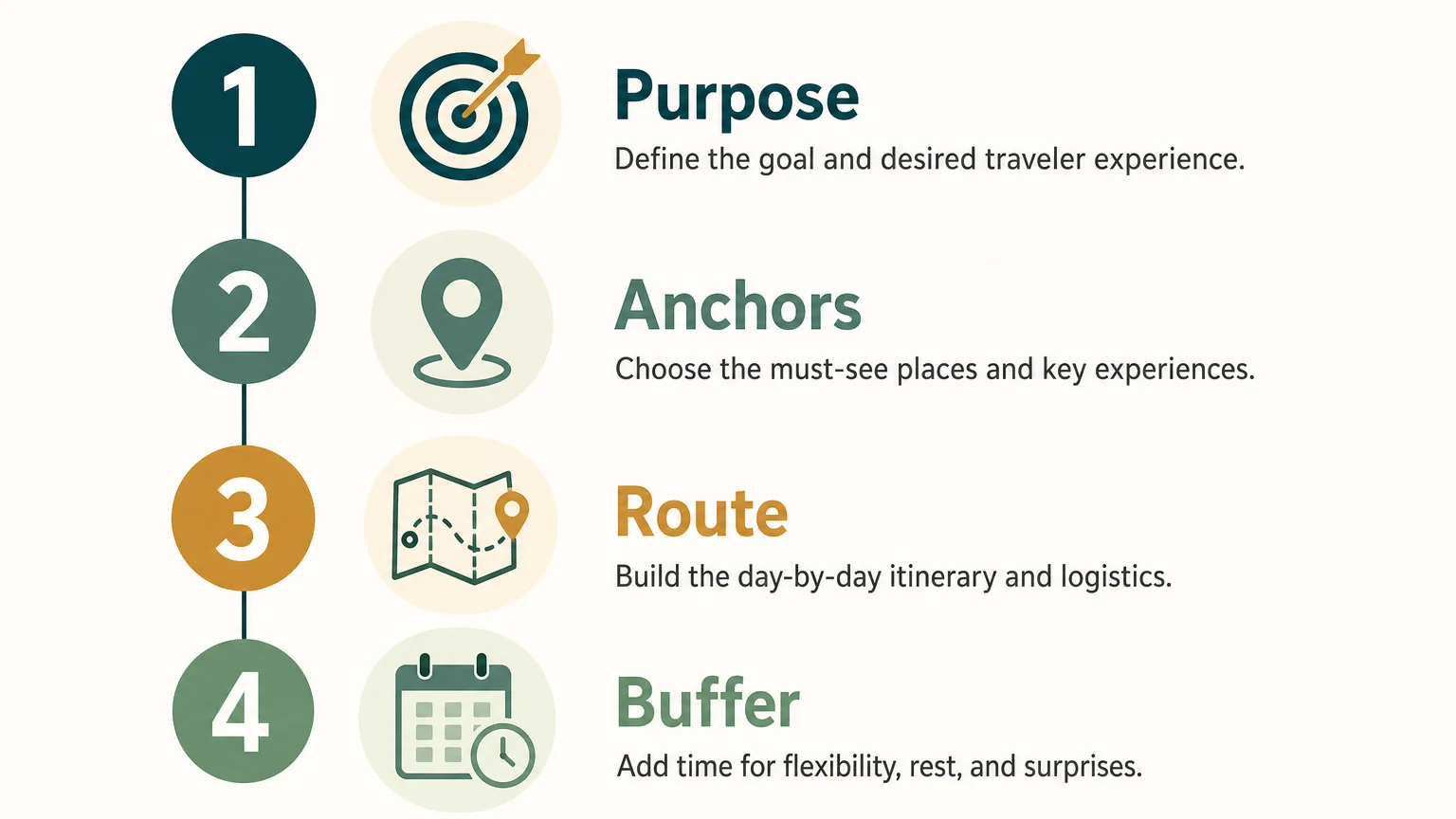
Begin with the trip purpose. A cultural city break, a family holiday, a road trip, and a business incentive program require different planning decisions. Define what the trip must achieve before you collect activities, restaurants, and excursions.
Write down the practical constraints first. Include travel dates, arrival and departure points, budget, group size, mobility needs, preferred transport, accommodation standards, and any fixed reservations. If you are planning for someone else, confirm these details before recommending destinations or experiences.
Next, identify three levels of priority. Your essential experiences are the activities that justify the trip. Your preferred experiences would improve it but can be removed. Your optional ideas are useful only if time, weather, energy, and budget allow them.
This distinction prevents a common mistake, which is treating every interesting idea as mandatory. A strong itinerary reflects the traveler’s priorities rather than the total number of attractions available.
For professional travel planning, collect this information in a reusable brief. A structured brief can include traveler profiles, preferred hotel categories, dietary requirements, activity preferences, destination knowledge, and commercial constraints. This makes future itinerary design faster and more consistent.
How do you choose activities without overloading the trip?
A 2026 report based on observed planning behavior from more than 40,000 travelers across 183 countries identified two useful patterns. Planning activity peaked approximately 56 days before departure, and travelers often built their schedules around “pillar activities,” meaning experiences that shaped the rest of the itinerary. The findings appear in the 2026 Pilot report.

Use this principle by selecting a small number of anchors for each destination. An anchor could be a museum reservation, a guided hike, a festival, a family celebration, or a meeting. Place these fixed elements first, then build nearby experiences around them.
For example, a three-day city break may have one major anchor each morning. The afternoon can include a nearby neighborhood, market, park, or restaurant. The evening should remain flexible unless a reservation or event makes it necessary to commit.
When you design journeys for different traveler profiles, pace matters as much as destination. A family may need shorter transfers and predictable meal times. A couple may prefer fewer activities with more time for dining. A group or MICE program may require fixed meeting points, coordinated transport, and backup options.
For client projects, our customized travel itineraries approach supports this type of planning by keeping the journey aligned with traveler preferences instead of forcing every trip into the same template.
How should you organize locations and travel time?
Imagine placing every attraction on a map before assigning activities to specific days. This simple step reveals whether your plan flows naturally or sends travelers repeatedly across the same city.
Group activities into geographic clusters. In a large city, organize the itinerary by district or neighborhood. On a road trip, group stops by driving direction and overnight location. For a multi-country journey, separate the plan into logical regions and confirm the transport connection between each one.
Then estimate realistic travel time. Do not rely only on the fastest route shown online. Include time to find a station, walk through an airport, collect luggage, park a car, check into accommodation, or reach a meeting point.
Travel time also affects energy. A 30-minute transfer may be acceptable after breakfast, but several transfers in one afternoon can make the day feel difficult. When the group includes children, older travelers, or people with limited mobility, reduce the number of transitions even further.
Build each day around a simple sequence: starting point, main activity, nearby activity, meal, optional experience, and return route. This creates a clear structure without requiring a rigid timetable for every moment.
Artificial intelligence can help suggest routes or generate an initial list, but you should verify every recommendation. Check seasonal opening hours, reservation requirements, transfer conditions, local holidays, and the actual distance between locations before sharing the itinerary.
How can you make the schedule realistic and flexible?
The strongest itinerary is not the one with the most entries. It is the one travelers can follow comfortably. Leave enough space for meals, rest, photographs, queues, delays, weather changes, and the simple pleasure of staying longer somewhere enjoyable.
Use time blocks instead of filling every minute. Mark fixed commitments with a specific time, then describe flexible activities by part of day. For example, a morning museum reservation can be followed by a flexible lunch and an afternoon neighborhood walk.
Include at least one flexibility buffer in each demanding day. This can be an unscheduled hour, an optional activity, or a nearby alternative. Buffers make it easier to respond when a train is late, rain changes the plan, or travelers need more rest.
Meal planning deserves particular attention. A long sightseeing day without a practical lunch option often creates unnecessary stress. Choose restaurants near the route, confirm dietary requirements, and avoid making every meal dependent on a distant reservation.
A 2026 Deloitte survey reported that 43% of respondents used generative AI in trip planning. The Deloitte survey supports the growing role of digital assistance, but generated ideas still require human review.
Use automated suggestions for inspiration, drafting, and comparison. Keep responsibility for judgment, accuracy, safety, and suitability with the planner. This is especially important when the itinerary involves international transport, remote areas, medical needs, or complex group logistics.
What information should the final itinerary include?
Budget pressure makes detailed preparation more valuable. An itinerary should show more than sightseeing ideas. It should connect activities with transport, accommodation, reservations, estimated costs, and clear instructions.
Create a daily budget that separates fixed and variable expenses. Fixed costs may include flights, hotels, transfers, and prepaid activities. Variable costs may include meals, local transport, tips, shopping, and optional excursions.
For client work, track supplier cost, markup, selling price, payment status, and remaining balance. This helps you identify margin changes when a traveler upgrades a hotel, removes an activity, or changes the transport plan.
Local experiences can also improve the quality of the journey. According to Expedia research published in 2026, 92% of surveyed travelers said local activities contribute to more immersive trips. Include these experiences when they match the traveler’s interests, schedule, and budget.
Your final document should normally contain the following information:
A well-structured traveler-facing itinerary should be easy to scan on a phone and easy to print when necessary. Keep operational notes available to the planning team, but present travelers with the information they need at each stage.
Which tools can help you create and share the itinerary?
A spreadsheet or document may be sufficient for a simple personal trip. More complex journeys require better control over versions, pricing, suppliers, approvals, and client communication.
The 2026 Amadeus travel trends report cites 2025 data showing that 25% of travelers had received outdated or inaccurate information while planning. The Amadeus report highlights why current information and careful verification matter throughout the planning process.
When several people need to review or update the same journey, centralized itinerary builder software can reduce duplicated work. With our itinerary builder software, travel professionals can connect itinerary design with budgeting, quotation documents, client proposals, supplier information, and operational follow-up.
Choose a tool according to the complexity of your workflow. For a personal holiday, simplicity and offline access may be the priority. For a travel agency, you may also need reusable project templates, role-based access, multilingual content, multiple currencies, branded documents, approval steps, and financial visibility.
Before sharing the itinerary, review it from the traveler’s perspective. Can someone understand what happens next without searching through emails? Are addresses, times, booking references, and contact details visible? Is it clear which activities are confirmed and which remain optional?
A digital format should support updates without creating multiple conflicting versions. If a hotel changes, a supplier adjusts a pickup time, or a traveler approves an alternative activity, the revised information should reach everyone who relies on the itinerary.
For agencies managing several trips at once, our travel itinerary planner can support a more connected process from itinerary creation to proposal sharing and ongoing trip management.
Build an itinerary that supports the journey
To create a trip itinerary that works, start with purpose and constraints, select a few meaningful anchors, group activities by location, and protect enough time for transport and rest. Add costs, reservations, contact details, and alternatives so the plan remains useful when conditions change. The best itinerary is structured enough to guide travelers while remaining flexible enough to feel like a journey.
Take action with Ezus
Once itinerary planning involves client preferences, supplier information, budgets, approvals, and changing operational details, a simple document can become difficult to maintain. You need one reliable process that keeps the journey clear for travelers and manageable for your team.
Our travel itinerary builder helps travel agencies, DMCs, tour operators, and MICE professionals create customized trips, manage budgets, prepare branded proposals, collaborate across teams, and share traveler-facing information. With onboarding, templates, support, and integration options, Ezus can help you move from the first request to a more organized travel operation.
Frequently Asked Questions
What is the first step when you create a trip itinerary?
Start by defining the purpose, dates, budget, traveler profile, and fixed commitments. These constraints help you select suitable activities and prevent an unrealistic schedule.
How many activities should you include each day?
There is no universal number, but most days should have one or two main priorities. Add nearby optional activities rather than scheduling a continuous sequence of fixed appointments.
Should you plan an itinerary by time or by location?
Use both, but organize locations first whenever possible. Grouping nearby experiences reduces unnecessary travel, then assign fixed reservations and realistic time blocks within each area.
How can you keep a trip itinerary flexible?
Separate confirmed commitments from optional ideas and include a buffer in demanding days. Prepare nearby alternatives for rain, delays, closures, or changes in traveler energy.
Can software help you create a trip itinerary?
Yes, software can centralize activities, suppliers, budgets, documents, approvals, and traveler communication. Ezus is designed for travel professionals who need to manage itinerary creation alongside sales, operations, and financial workflows.
.jpeg)

Join Ezus today
Request a demo today and discover how our software can help you reach new heights.

.jpg)