Which trips leave next week? Which invoices are overdue? What is still missing before the Marrakech quote goes out?
Simple questions. Yet answering them means opening one project, then another, filtering a list, exporting a table and cross-checking it all by hand.
Same story when a hotel sends its new rate sheet: an afternoon of copying room types and seasons into your catalog, line by line.
Good news: with the Ezus connector for Claude, you ask your question in plain language and the answer comes straight from your Ezus account. And when something needs creating, Claude prepares it and waits for your go-ahead.
In short
- The Ezus connector for Claude is an official MCP connector that links Claude, the AI assistant developed by Anthropic, to your Ezus account.
- You ask questions in plain language, and the answers come from your own Ezus data.
- Once write access is enabled, Claude can create projects, import rate sheets and record payments, always after your confirmation.
- The connector is in beta, available from the Ezus Premium plan, read-only by default and unable to delete data.
Want to see it on your own data? Book a demo or discover the Ezus connector for Claude.
Why the travel agency back office still runs on clicks and copy-paste
Information spread across screens
Project status, supplier rates, payments: each lives in its own view. A cross-cutting question, such as "which confirmed trips in October still have unpaid invoices?", means opening projects one by one or building a report.
Data entry that never ends
Rate sheets arrive in Excel, itineraries in Word or PDF, rooming lists by email. The data already exists, but it has to be typed again to land in your tool. Every re-entry costs time and opens the door to a typo.
Gaps spotted too late
A night without accommodation, a traveler without an email, a line without a supplier. Too often, they surface once the quote has gone out, or worse, a few days before departure.
What travel teams now expect from AI
Asking instead of searching
AI assistants have found their way into many teams' daily routine: drafting an email, summarizing a document, reworking a text. The obvious next step is to ask them about your own business.
An AI that knows your files without putting them at risk
A generic assistant knows nothing about your projects, and pasting client data into it is rarely a good idea. What agencies need is an assistant connected to their own tool, with the same access rights, and unable to break anything.
What is the Ezus connector for Claude?
The Ezus connector for Claude lets travel agencies, DMCs and tour operators query their data, check their files and automate certain operational tasks from Claude, without changing the way they work.
Claude is the AI assistant developed by Anthropic. The Ezus connector links it directly to your account through MCP (Model Context Protocol), an open standard released by Anthropic in late 2024. Ezus runs its own official MCP server, mcp.ezus.ai, built on the Ezus public API: no intermediate copy, no syncing, your data stays in Ezus. By default, Claude can only view your data. Write access is enabled for your agency on request.
How to connect Ezus to Claude in 5 steps
Before you start, you need an Ezus Premium plan, a Claude account, your usual Ezus credentials and your account's API key. The key is available in Settings > Developers in Ezus, a page reserved for administrators.
- Open Claude's settings, then the Connectors section.
- Add a custom connector with the + button.
- Name it Ezus and enter the MCP server URL:
https://mcp.ezus.ai/mcp. - Click Connect and sign in with your usual Ezus credentials.
- Paste your Ezus API key and authorize access. The key is only requested once.
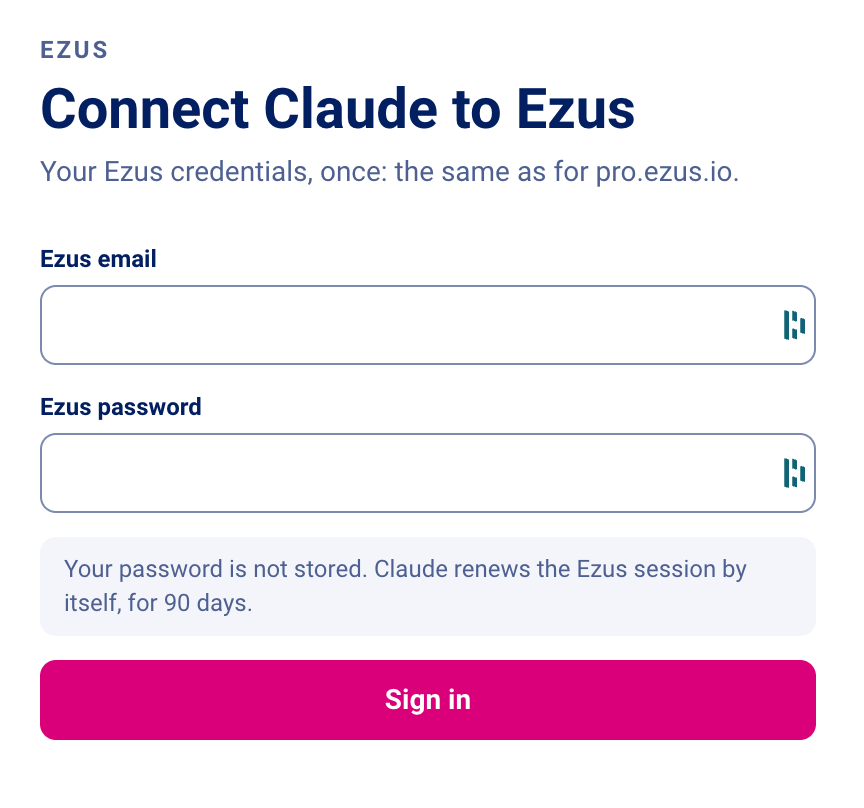
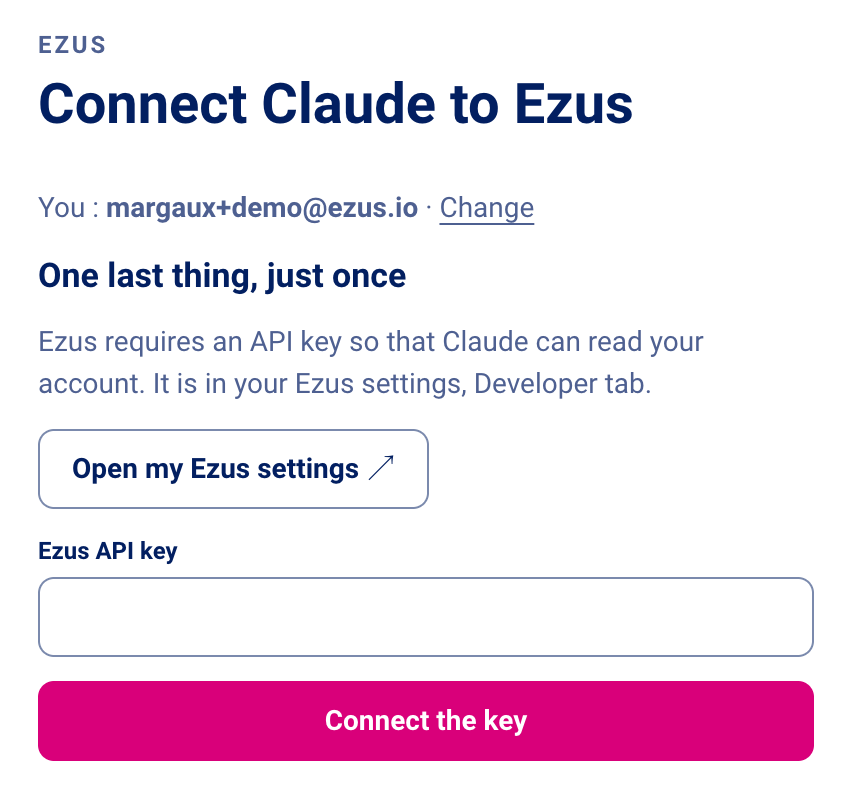
On a Claude Team or Enterprise account, an organization owner adds Ezus once for the whole organization. Each user then connects with their own Ezus credentials. To check that everything works, open a new conversation and ask: "Who am I in Ezus?" or "List my last ten projects."
Full guide: Connect Ezus to Claude
What can you do with Claude and Ezus?
- Query your business. "Which projects leave next week?", "What is my net margin on invoices issued in September, by sales manager?" Read-only, available as soon as you connect.
- Check a file before sending. Nights without accommodation, travelers without an email or phone number, margin line by line.
- Create a project from an existing itinerary. Attach a Word file, a PDF or a supplier email: Claude builds the steps, services, prices and descriptions in your itinerary builder.
- Import a supplier catalog. Claude maps the columns of a rate sheet to Ezus fields, flags duplicates and price differences, tests about twenty rows, then imports the rest into your supplier management. Seasonal prices are supported.
- Enrich your catalog. Short and long descriptions for your products and suppliers, in several languages.
- Record a payment. A client deposit or a supplier invoice, without opening the project. Claude summarizes the project, amount and date before saving it to your financial management.
- Work across several Ezus accounts. One connector per account: Claude can read one and write to another in the same conversation.
Every use case with example requests: What you can do with Claude and Ezus
What travel agencies gain day to day
Time back for your travelers
Answers in seconds instead of a tour of your screens, and data entry you can delegate. No new interface to learn: you simply type your request.
Fewer entry errors
Claude reuses items that already exist to avoid duplicates, reviews the data in place before updating anything, and relies on the response returned by Ezus to confirm what was saved.
Control stays with you
- No deletions: the connector has no delete tool.
- Write access off by default, enabled for your agency only on request.
- Confirmation before every change: Claude shows what it plans to save and waits for your yes.
- Your access rights stay the same: each user connects with their own account and only sees what Ezus already lets them see.
Requirements and limits
- The connector relies on the Ezus public API, available from the Premium plan.
- On the Claude side, a Pro, Max, Team or Enterprise account is recommended. The free plan works but accepts only one custom connector.
- The connector is in beta: it is safe to use on your account, and its features will keep evolving with your feedback.
- Some things still happen in Ezus: prices by group-size tier, and step addresses after a project is created from an itinerary.
- When you ask Claude to design a trip from scratch, services, prices and schedules are suggested by Claude, not taken from your Ezus data. Check them, along with supplier availability, before sending anything to a client.
Go further on AI for travel agencies
- How AI is changing the work of travel agencies: which tasks disappear and which skills grow.
- What is MCP? The protocol behind the connector, explained without jargon, with a safety checklist.
- Claude for travel agencies: 12 use cases with ready-to-use prompts.
Frequently asked questions
Who can use the Ezus connector for Claude?
Ezus customers on the Premium plan, which includes access to the public API. On the Claude side, a Pro, Max, Team or Enterprise account is recommended; the free plan works, limited to one custom connector.
Where do I find my Ezus API key?
In Settings > Developers in Ezus. This page is only accessible to account administrators: if you are not one, ask an administrator for the key. It is only requested once, when you connect.
Can Claude delete my data?
No. The connector has no delete function. Anything you want to delete must be deleted directly in Ezus.
Why does Claude say it can't create anything?
That is the default behavior: the connector is read-only. Ask your Ezus contact to enable write access for your agency.
What can Claude see in my Ezus account?
Only what your own Ezus user rights allow. Claude accesses Ezus with your credentials, so each person on your team sees in Claude exactly what they see in Ezus.
What if Claude gets something wrong?
Nothing is written without your confirmation, and nothing can be deleted. You review each change before saying yes, then check the result in Ezus.
How long does the connection last?
The session renews automatically for 90 days. After that, Claude simply asks you to reconnect.
Can I stop using it at any time?
Yes. Turn Ezus off in a conversation, or disconnect it from Claude's connector settings. Your Ezus data stays intact.
The connector doesn't show up in Claude. What should I do?
On a Claude Team or Enterprise account, an organization owner must add it first. Otherwise, check that the server address ends with /mcp.
Your back office, one question away
Ezus already brings your production, sales and operations together. The connector for Claude changes how you reach them: you ask, Claude looks things up and prepares the work, you confirm.
Start with questions about your business, then ask your Ezus contact to switch on write access when you are ready to hand over data entry.
Book a demo to see Claude at work on your own Ezus data.
.jpeg)

Join Ezus today
Request a demo today and discover how our software can help you reach new heights.


.jpg)
.png)
.jpg)