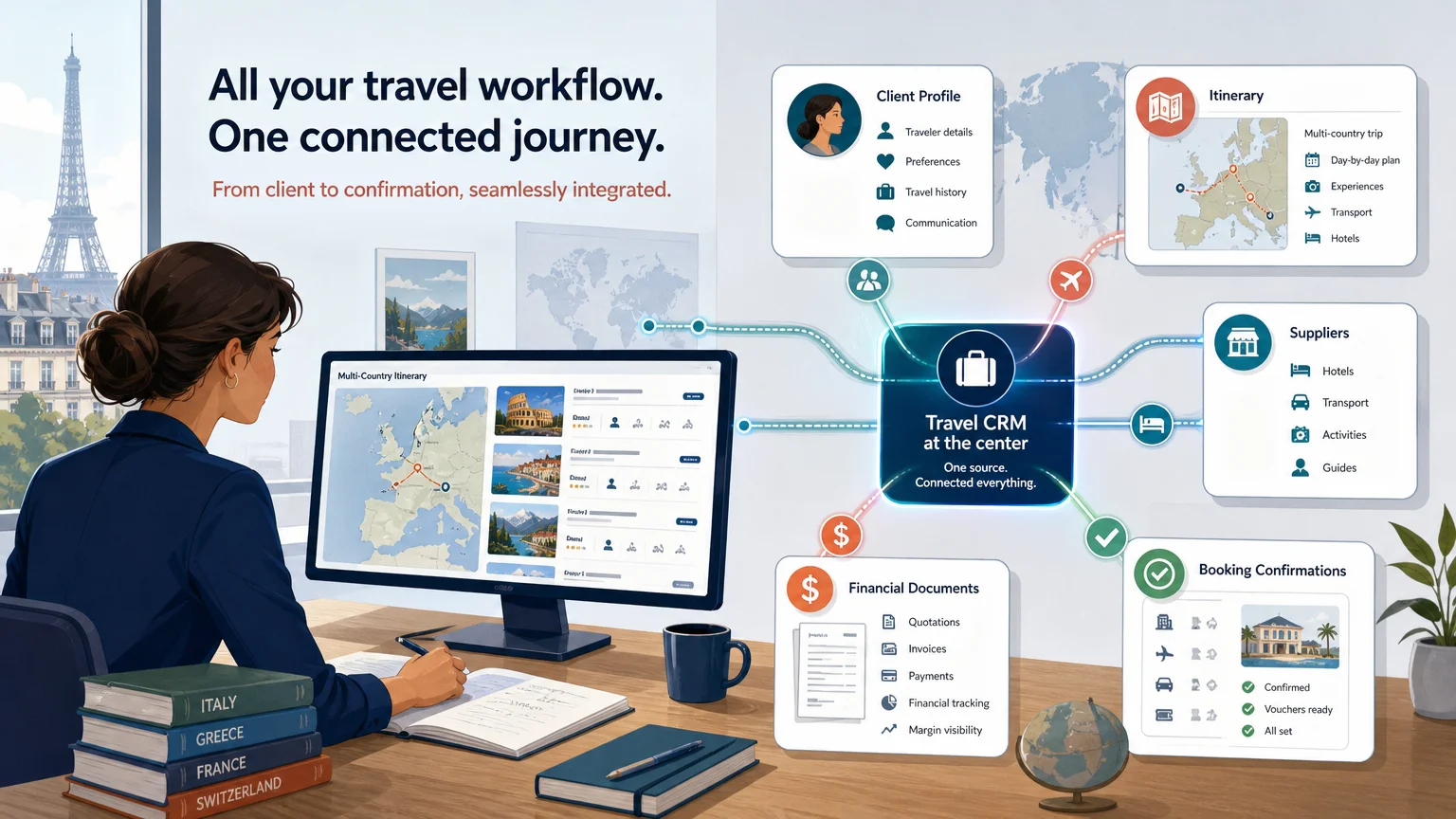
Summary: Travel software CRM integration connects travel inquiries, client records, itineraries, bookings, tasks, and financial data across systems. Reliable integration depends on clear ownership of data, accurate field mapping, secure APIs or webhooks, and workflows designed for travel operations. The right approach reduces duplicate entry while preserving client context, supplier details, and margin visibility.
A travel inquiry can begin in a form, continue through email, become an itinerary, and eventually turn into a booking, invoice, and post-trip relationship. Without a connected workflow, each handoff creates another opportunity for missing information or delayed follow-up. Our integrated CRM for travel businesses is designed to connect customer management with the broader travel production process.
In 2026, integration is becoming a practical investment priority rather than a technical extra. A global study of travel management company leaders identified content and booking platform integration as a 26% budget area and client servicing platforms, including CRM systems and client portals, as a 24% area. The Expedia Group study also highlights the ongoing challenge of fragmented systems.
What does travel software CRM integration actually connect?
Travel software CRM integration links the system used to manage relationships with the systems used to design, sell, operate, and account for trips. It can connect a CRM with an itinerary builder, booking platform, accounting tool, email service, marketing database, supplier catalog, payment system, or client portal.
The purpose is not simply to copy contacts from one application to another. A useful integration creates a shared operational context. When a prospect becomes a client, the relevant inquiry, preferences, travel dates, documents, project status, and communication history should remain connected.
For a travel agency, this may mean that a new website inquiry creates a lead in the CRM and a project in the travel production platform. When the project advances, the integration can update the opportunity stage, assign a task, notify the sales manager, or trigger a follow-up message.
For a DMC or tour operator, the same connection may link a client record to supplier requests, itinerary versions, booking statuses, invoices, and payment milestones. For a MICE agency, it may connect a group project with attendee information, budgets, approval stages, and internal responsibilities.
The most reliable architecture establishes a source of truth for every important object. The CRM may own relationship history and sales stages. The travel platform may own itinerary structure, supplier products, project costs, and operational status. Accounting software may remain authoritative for invoices and payments.
This division prevents conflicting edits. It also makes the integration easier to test because each system has a defined responsibility. Without this structure, teams often create two incomplete records instead of one dependable customer view.
Which travel data should move between systems?
Consider a client who requests a multi-country trip. The integration should preserve more than a name and email address. It should carry the information that allows sales, production, finance, and operations teams to act without asking the client to repeat the same details.
Lead and contact data commonly includes names, contact details, company information, lead source, preferred communication channel, assigned owner, consent status, and qualification notes. These fields support routing, prioritization, and follow-up.
Trip and itinerary records can include destinations, travel dates, traveler numbers, trip type, project title, itinerary status, version number, and links to proposals or client portals. A CRM does not always need every itinerary detail, but it should know which project belongs to which opportunity.
Client preferences may cover accommodation style, activity interests, dietary requirements, mobility considerations, preferred destinations, budget range, and previous travel history. These details help teams personalize proposals and avoid repeated discovery conversations.
Booking and supplier data may include supplier names, confirmation status, service dates, booking references, cancellation deadlines, and responsible team members. This information is particularly valuable when customer service must respond quickly during a trip.
Financial data can include quote totals, currencies, markups, deposits, payment status, projected margin, and actual margin. The integration should respect accounting controls and avoid treating a draft quote as a confirmed financial transaction.
Our travel agency CRM software connects CRM activity with travel production, supplier management, budgeting, proposals, invoicing, and financial tracking. The practical advantage comes from linking the relationship record to the work required to deliver the trip.
Not every field should synchronize in both directions. A good data map defines which system can create, update, or read each field. It also specifies what happens when information is incomplete, duplicated, changed twice, or deleted.
Should you use an API, webhooks, no-code automation, or native integration?
The right connection method depends on the workflow, the required speed, the technical resources available, and the level of control your team needs.
APIs offer greater flexibility, but they require authentication, rate-limit handling, error management, and careful testing. Webhooks can reduce polling and improve response time, but they may send only partial information or require retry and duplicate-event handling.
A 2018 academic case study on integrated cloud CRM systems described business application integration as resource-intensive and technically complicated. That finding remains relevant because travel workflows combine customer, operational, financial, and supplier data. The academic case study reinforces the importance of defining integration scope before development begins.
A hybrid approach is often practical. A webhook can signal that a project or opportunity changed. The integration layer can then call an API to retrieve the complete record, validate the data, apply business rules, and write the required update to the receiving system.
Our integrations can use APIs, webhooks, no-code connectors, custom exports, and native connections. For example, our MTrip integration with EZUS illustrates how travel project and customer information can support a connected client-facing experience.
Why does travel-specific context matter in CRM integration?
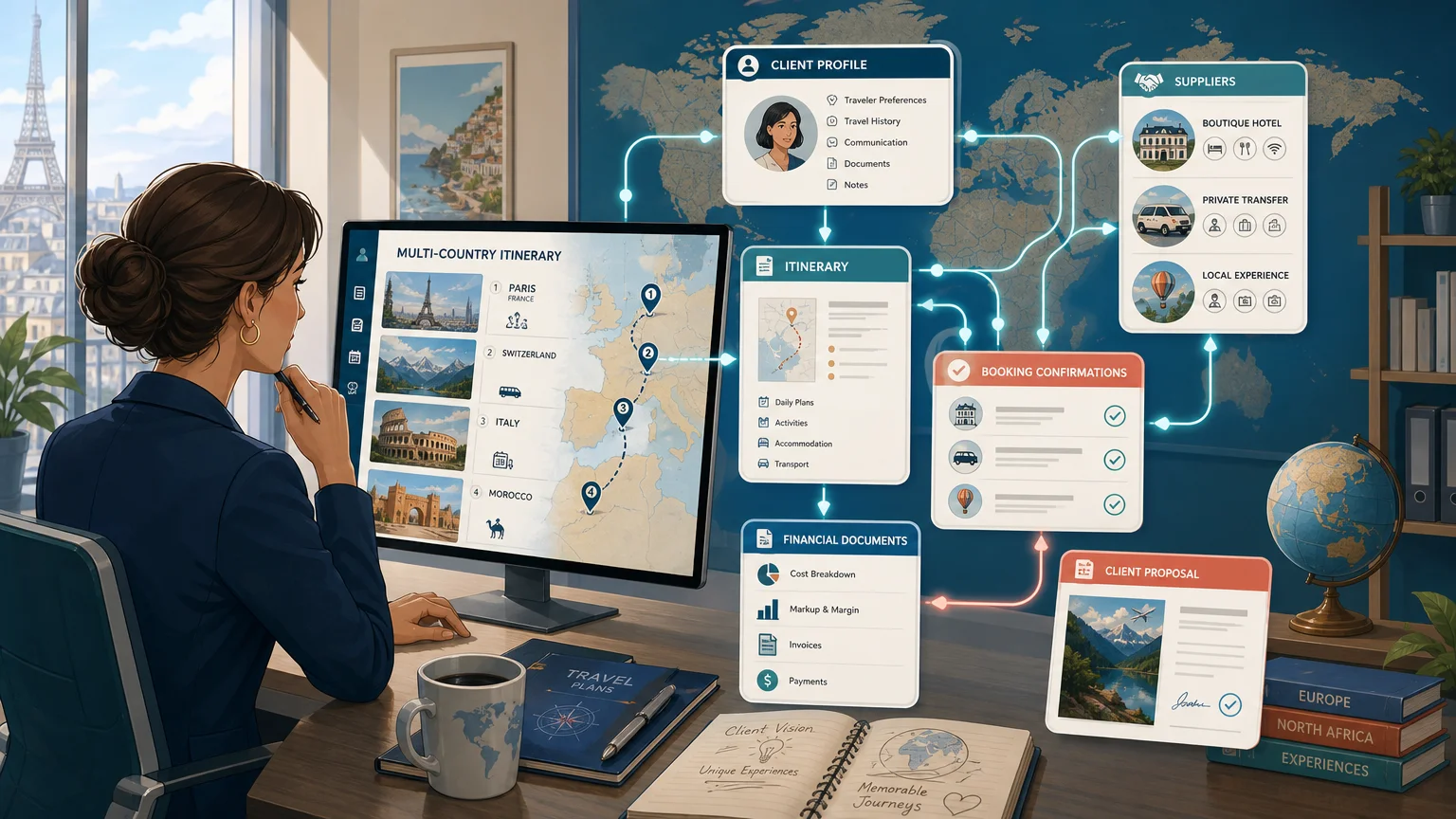
A generic CRM can store contacts, activities, opportunities, and notes. Travel businesses need those capabilities, but they also need the operational context behind a sale.
A client record is not complete if it only shows that someone requested a trip. The team may also need to know whether the request concerns FIT travel, a group program, a corporate incentive, or a tailor-made family itinerary. The record may need to connect to destinations, travel dates, suppliers, rooming requirements, quotation versions, and margin targets.
This is the difference between contact synchronization and meaningful travel workflow integration. Contact synchronization moves basic identity data. Meaningful integration connects the commercial relationship with the production work and the financial consequences of the trip.
General-purpose platforms such as Pipedrive or Zoho CRM can be configured with custom fields, pipelines, automations, and external applications. Travel-focused tools such as Travefy and moonstride also address specific combinations of client management, itineraries, bookings, communication, or operations. The question is not whether a platform has a CRM label. The question is whether it preserves the information your teams use every day.
For example, a sales representative should be able to see that a proposal is awaiting approval, while the production team sees the current itinerary version and the finance team sees the projected margin. Those views can come from one connected workflow without giving every user access to every field.
Role-based permissions are especially important for international travel businesses. Teams may work across multiple brands, currencies, languages, markets, or legal entities. Integration design should therefore account for access rights, data residency, consent, currency rules, and reporting requirements.
Our travel CRM software is built around the connection between client relationships, travel projects, proposals, supplier information, financial tracking, and team collaboration. This helps reduce the gap between selling a trip and delivering it.
How do you implement and measure a reliable integration?
A successful implementation begins with process design, not with connecting applications. Before selecting a connector or commissioning custom development, document how information moves from the first inquiry to the final payment and post-trip follow-up.
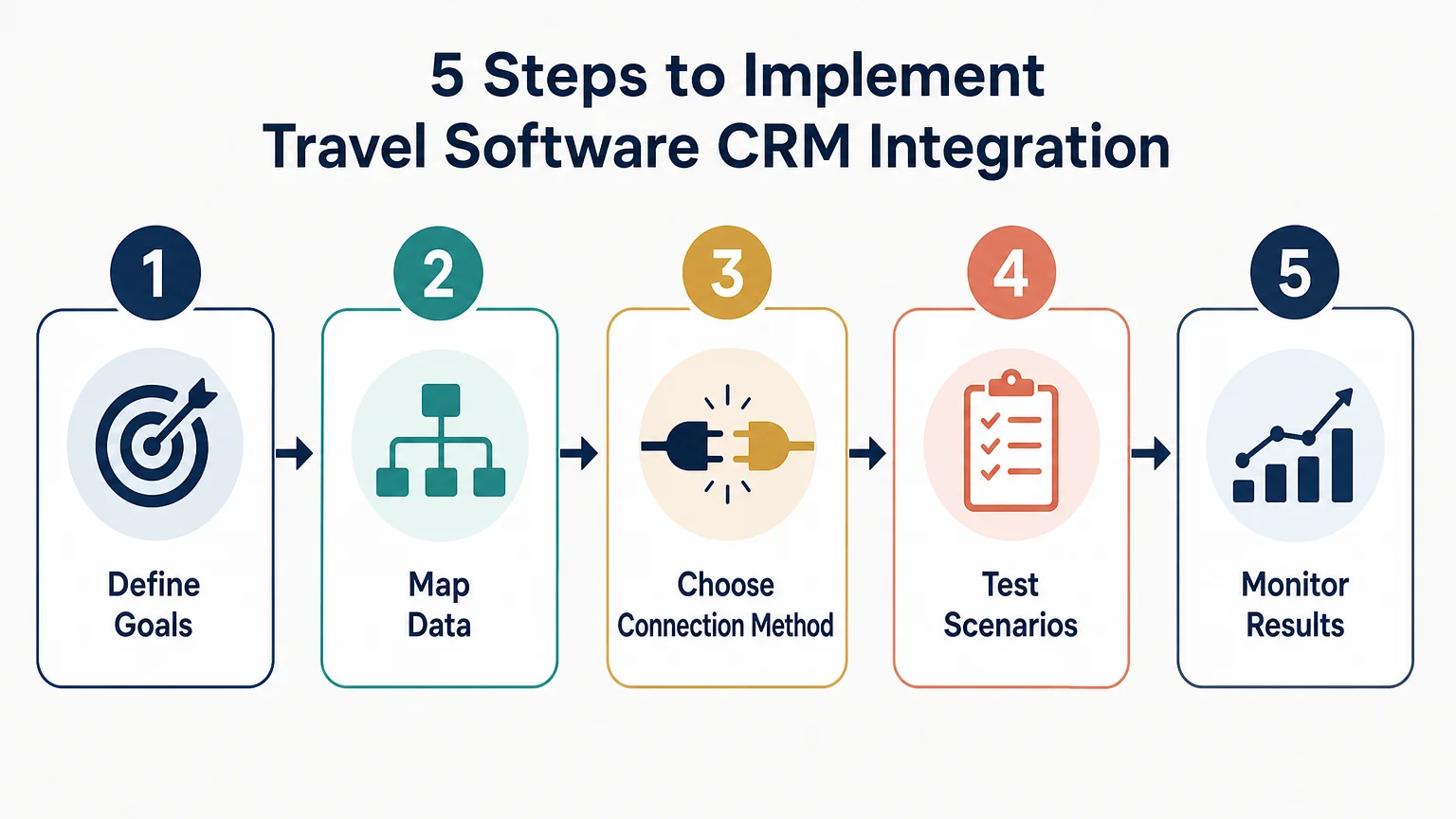
Measurement should focus on operational outcomes rather than the number of connected apps. Useful indicators include time from inquiry to first response, time from brief to quotation, duplicate contact rate, data completeness, failed synchronization events, task completion, quote follow-up rate, and the accuracy of projected versus actual margins.
Data quality deserves special attention. In an August 2026 audit of 545 tourism businesses across 44 countries, only 9.8% could trace a booking back to its source. Among businesses with analytics installed, 77.8% did not record phone clicks, email clicks, or a link to the booking system. The 2026 tourism audit shows why connected reporting must be designed deliberately.
Security and governance should be part of the initial design. Use encrypted connections, restricted credentials, role-based access, consent controls, audit logs, and documented retention policies. Integration endpoints should also support monitoring, retries, deduplication, and reconciliation after outages.
When comparing platforms, assess the entire travel workflow rather than the CRM screen alone. Consider whether the system supports:
Our platform combines travel production, sales, operations, CRM, supplier management, invoicing, payments, and financial tracking. It also supports onboarding, migration, templates, role-based access, multi-currency workflows, multi-language operations, and connections with external business tools.
The practical path to better integration
Reliable travel software CRM integration is less about connecting the largest number of applications and more about connecting the right records at the right moments. Begin with ownership, field mapping, security, and measurable workflows. Then choose APIs, webhooks, no-code automation, native integrations, or a hybrid architecture according to the complexity of your operations. For travel agencies, DMCs, tour operators, and MICE teams, the strongest setup is one that keeps client relationships, trip production, supplier activity, and financial decisions connected without sacrificing control.
Take action with Ezus
If your team is moving between a CRM, spreadsheets, email, itinerary tools, supplier records, and accounting software, integration can remove unnecessary handoffs. The right connection can help you keep client context, project details, operational tasks, and financial information aligned as a trip progresses.
We support travel software integrations through APIs, webhooks, no-code connectors, custom workflows, exports, and native connections. Our onboarding, technical support, documentation, and migration guidance help your team configure a workflow that fits its processes. Explore our travel software integrations and identify the connection method that matches your systems, resources, and growth plans.
Frequently Asked Questions
What is travel software CRM integration?
Travel software CRM integration connects customer relationship data with travel production, itinerary, booking, supplier, finance, and communication systems. It allows relevant information to move between platforms without repeated manual entry.
Which travel data should be synchronized?
Common data includes leads, contacts, preferences, travel dates, trip types, itinerary status, supplier details, bookings, quotes, payments, and tasks. Your data map should define which system owns each field and which updates are allowed.
Are APIs or webhooks better for travel integrations?
APIs are useful for detailed queries, migrations, scheduled synchronization, and controlled updates. Webhooks are useful for event-driven actions, while a hybrid design can combine real-time triggers with full record retrieval.
How can a travel business avoid duplicate CRM records?
Use a stable external identifier, define matching rules for email and company records, and make update workflows idempotent. Regular reconciliation and clear ownership rules also help prevent duplicate clients and conflicting project records.
Can Ezus connect with an existing CRM?
Yes, Ezus supports CRM connections through options such as APIs, webhooks, no-code connectors, custom workflows, exports, and native integrations. The appropriate method depends on the CRM, the required data, the selected plan, and the complexity of the workflow.
.jpeg)

Join Ezus today
Request a demo today and discover how our software can help you reach new heights.


.svg)


.jpg)